> ## Documentation Index
> Fetch the complete documentation index at: https://kino.ai/docs/llms.txt
> Use this file to discover all available pages before exploring further.
# Changelog
# Reliable editing, desktop app, and a new brand
Kino's editor is radically more reliable. Longer sessions, stable playback, and a new desktop app. This release also adds FCP 7 XML export, a synced script viewer, and 8x faster playback start. And also, we rebranded!
 ## A more reliable editor
Previous versions of Kino struggled with editing sessions longer than an hour, particularly when many people were editing at once. Now, playback is more stable, the timeline no longer hangs, and the media player holds up on multi-hour high resolution video (both local and remote).
## Desktop app
Kino runs as a standalone desktop app on Mac. Get native window management, better performance, and a dedicated workspace outside your browser.
## A more reliable editor
Previous versions of Kino struggled with editing sessions longer than an hour, particularly when many people were editing at once. Now, playback is more stable, the timeline no longer hangs, and the media player holds up on multi-hour high resolution video (both local and remote).
## Desktop app
Kino runs as a standalone desktop app on Mac. Get native window management, better performance, and a dedicated workspace outside your browser.
 ## UI overhaul
Total overhaul of the interface to make it tighter, more consistent, and more professional. Less web-like, and more like a real tool you use every day. Padding, spacing, colors, border radii, hover states, and text sizes were all revisited across every panel and component.
## FCP 7 XML export
Export your timeline as FCP 7 XML and open it in DaVinci Resolve or any NLE that reads XML. The basic loop is closed: you can import your timeline into Kino, export it to XML, and open it in an NLE that reads XML.
## Sequence previews
Sequences on the timeline now show a live miniature of their nested tracks. Dynamic elements like motion graphics also preview inline with stable track IDs, so you can see what's inside without opening the sequence.
## In-editor script viewer
## UI overhaul
Total overhaul of the interface to make it tighter, more consistent, and more professional. Less web-like, and more like a real tool you use every day. Padding, spacing, colors, border radii, hover states, and text sizes were all revisited across every panel and component.
## FCP 7 XML export
Export your timeline as FCP 7 XML and open it in DaVinci Resolve or any NLE that reads XML. The basic loop is closed: you can import your timeline into Kino, export it to XML, and open it in an NLE that reads XML.
## Sequence previews
Sequences on the timeline now show a live miniature of their nested tracks. Dynamic elements like motion graphics also preview inline with stable track IDs, so you can see what's inside without opening the sequence.
## In-editor script viewer
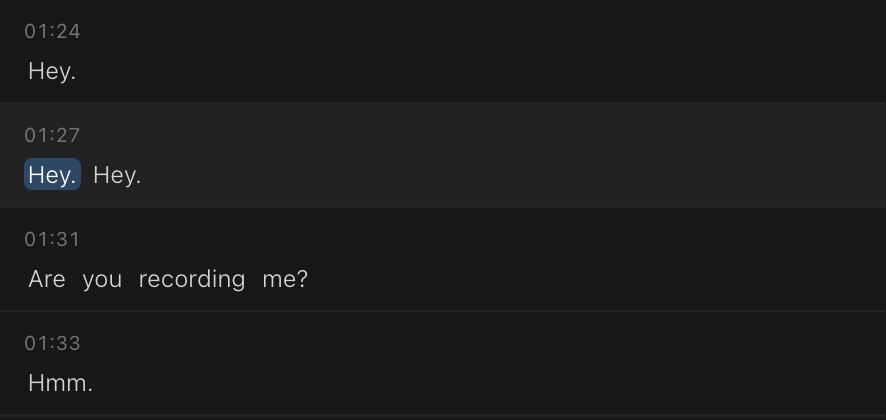 New panel that shows your *current timeline's* transcript as a scrollable script, synced to the playhead. Not just individual videos anymore! Click any word to jump to that frame.
## Canvas zoom gestures
Use trackpad gestures to zoom around the canvas more naturally. This release also ships a new solid color tool.
## 8x faster playback start
Kino's seeking latency for remote videos dropped from worst case \~4.5s (p99) to \~544ms. We also migrated to a new media storage system that is much more reliable and faster.
## Mobile support
Kino for media viewing now works on mobile. Chat with your footage, and browse your projects from your phone's browser. The editor and advanced features are still only available on desktop.
#### Improvements
* HEIC/HEIF photos are now supported for import
* Timeline clip indicator shows which portions of media are used, like DaVinci Resolve
* **Cmd+Enter** sends results in the command palette straight to the timeline
* New branding and color scheme from Primary Design sprint
* In-app feedback button for bug reports
* Faster remote media storage
* Significantly more resilient background job system
* New landing page
#### Fixes
* Fixed client-side rendering of captions and dynamic text
* Fixed option+drag crash on dynamic sequence items
* Fixed embedding errors during media processing
* Fixed HLS streaming and spritesheet generation on iPhone footage
* Fixed player null context and default track recursion
* Fixed bins and people management
* Volume boost beyond 0 dB now works consistently on items with both video and audio
* Fixed XML duration calculation and zero playback rate export
* Word-level search highlighting now works correctly for multi-word queries
* Fixed excessive retries causing page hangs
* Resolved video thumbnail decoding errors
* Fixed chat editor initialization race condition
* Clip deselection no longer unexpectedly clears trim points
* Improved login and auth flow reliability
* Fixed file picker cancel and browser compatibility
# Open alpha release
This release brings Kino to production-ready status with NLE imports, real-time collaboration, and dramatically improved reliability.
New panel that shows your *current timeline's* transcript as a scrollable script, synced to the playhead. Not just individual videos anymore! Click any word to jump to that frame.
## Canvas zoom gestures
Use trackpad gestures to zoom around the canvas more naturally. This release also ships a new solid color tool.
## 8x faster playback start
Kino's seeking latency for remote videos dropped from worst case \~4.5s (p99) to \~544ms. We also migrated to a new media storage system that is much more reliable and faster.
## Mobile support
Kino for media viewing now works on mobile. Chat with your footage, and browse your projects from your phone's browser. The editor and advanced features are still only available on desktop.
#### Improvements
* HEIC/HEIF photos are now supported for import
* Timeline clip indicator shows which portions of media are used, like DaVinci Resolve
* **Cmd+Enter** sends results in the command palette straight to the timeline
* New branding and color scheme from Primary Design sprint
* In-app feedback button for bug reports
* Faster remote media storage
* Significantly more resilient background job system
* New landing page
#### Fixes
* Fixed client-side rendering of captions and dynamic text
* Fixed option+drag crash on dynamic sequence items
* Fixed embedding errors during media processing
* Fixed HLS streaming and spritesheet generation on iPhone footage
* Fixed player null context and default track recursion
* Fixed bins and people management
* Volume boost beyond 0 dB now works consistently on items with both video and audio
* Fixed XML duration calculation and zero playback rate export
* Word-level search highlighting now works correctly for multi-word queries
* Fixed excessive retries causing page hangs
* Resolved video thumbnail decoding errors
* Fixed chat editor initialization race condition
* Clip deselection no longer unexpectedly clears trim points
* Improved login and auth flow reliability
* Fixed file picker cancel and browser compatibility
# Open alpha release
This release brings Kino to production-ready status with NLE imports, real-time collaboration, and dramatically improved reliability.
 ## Import from Adobe Premiere or DaVinci Resolve
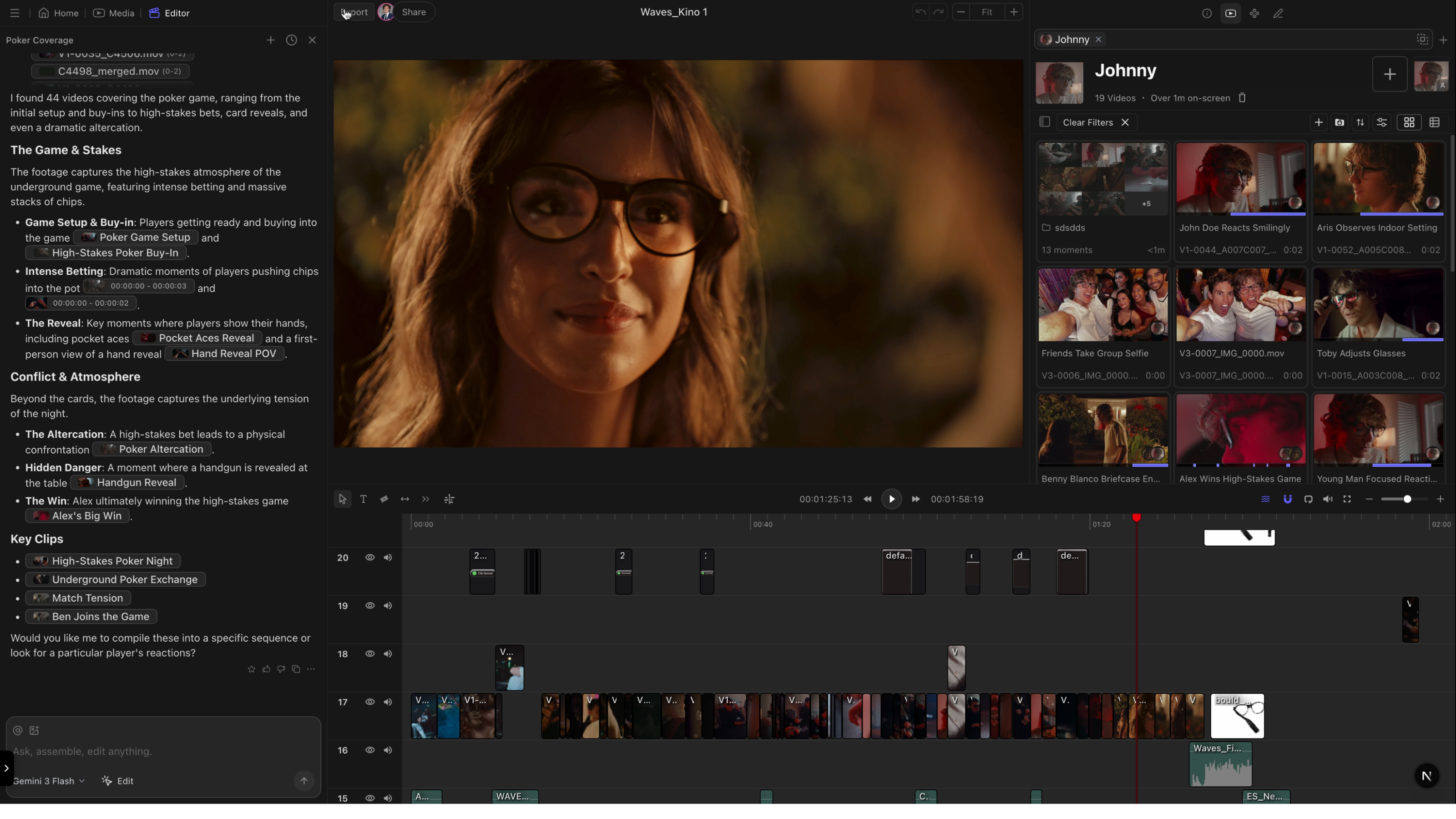
Drag in a project archive from your existing NLE and Kino rebuilds your timeline with full AI search, agentic editing, and shareability now available.
* **Premiere Pro**: Use Project Manager to create an archive (.prproj + media)
* **DaVinci Resolve**: Export a Project Archive (.dra)
Learn more in our [integration guides](/integrations).
## Real-time collaboration
Multiple editors can now work on the same timeline simultaneously. Changes sync instantly—no version conflicts, no "file in use" errors.
Presence indicators show where your collaborators are working, so you can coordinate without stepping on each other's edits.
## Motion graphics with subtracks
Describe a title, lower third, or animated background in chat. Kino generates it and adds it to your timeline.
Subtrack support lets you layer multiple motion graphics elements together for more complex compositions.
## Overhauled user interface
Every button, panel, item, color and interaction in Kino has been adjusted to fit a denser and more professional theme.
* Unnecessary padding and spacing has been removed, which means you can see more of your timeline, media, and chat all at once
* Fixed color inconsistencies across all components
* Buttons and list items respond instantly on hover (far fewer fade-in animations)
* Consistent border radius and text sizes across Kino
#### Improvements
* Rendering is now significantly more reliable across export formats
* Lighter storyboard thumbnails for faster canvas performance
* Processing bottlenecks reduced
* Responsive dropdown for bins and people on narrow screens
#### Fixes
* Fixed undo clearing entire timeline on load
* Fixed adding clips to playlists from search results
* Fixed hover card minimum width causing layout shifts
# Media comments & client-side rendering
Review footage with your team using timestamped comments. Exports are now up to 10x faster—and nearly 100x faster for pure motion graphics thanks to client-side rendering.
## Import from Adobe Premiere or DaVinci Resolve
Drag in a project archive from your existing NLE and Kino rebuilds your timeline with full AI search, agentic editing, and shareability now available.
* **Premiere Pro**: Use Project Manager to create an archive (.prproj + media)
* **DaVinci Resolve**: Export a Project Archive (.dra)
Learn more in our [integration guides](/integrations).
## Real-time collaboration
Multiple editors can now work on the same timeline simultaneously. Changes sync instantly—no version conflicts, no "file in use" errors.
Presence indicators show where your collaborators are working, so you can coordinate without stepping on each other's edits.
## Motion graphics with subtracks
Describe a title, lower third, or animated background in chat. Kino generates it and adds it to your timeline.
Subtrack support lets you layer multiple motion graphics elements together for more complex compositions.
## Overhauled user interface
Every button, panel, item, color and interaction in Kino has been adjusted to fit a denser and more professional theme.
* Unnecessary padding and spacing has been removed, which means you can see more of your timeline, media, and chat all at once
* Fixed color inconsistencies across all components
* Buttons and list items respond instantly on hover (far fewer fade-in animations)
* Consistent border radius and text sizes across Kino
#### Improvements
* Rendering is now significantly more reliable across export formats
* Lighter storyboard thumbnails for faster canvas performance
* Processing bottlenecks reduced
* Responsive dropdown for bins and people on narrow screens
#### Fixes
* Fixed undo clearing entire timeline on load
* Fixed adding clips to playlists from search results
* Fixed hover card minimum width causing layout shifts
# Media comments & client-side rendering
Review footage with your team using timestamped comments. Exports are now up to 10x faster—and nearly 100x faster for pure motion graphics thanks to client-side rendering.
 ## Comments
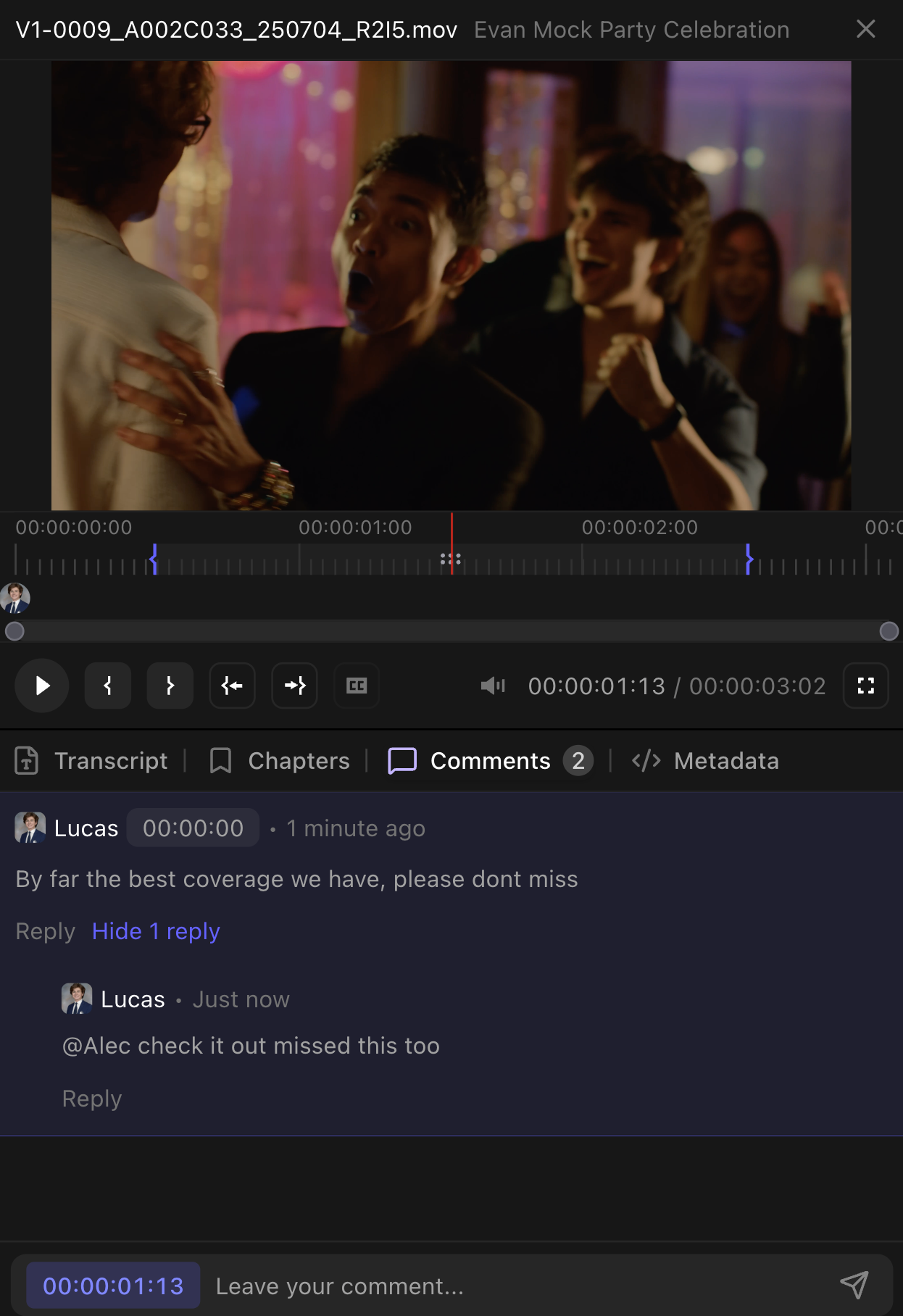
Leave comments on any frame of your media.
* **Timestamp linking**: Click a comment to jump to that moment
* **Replies and reactions**: Thread conversations and react with emoji
* **Shareable links**: Send a link that opens directly to a specific comment
## Client-side rendering
Exports now render directly in your browser instead of on our servers. The result is dramatically faster turnaround—up to 10x faster for video exports, and nearly 100x faster for pure motion graphics compositions.
Large videos also stream reliably on slow or unstable internet connections. Kino automatically adjusts quality to keep playback smooth.
#### Improvements
* 5x faster audio peak generation
* Cleaner model picker with legacy models removed
* Chat now sees which frame you're viewing in the editor
#### Fixes
* Fixed dragging new videos onto the timeline
* Fixed cut/paste edge cases on timeline
* Fixed border styles not loading on landing page
* Fixed non-16:9 video aspect ratio handling
# Skimming & fast seek
Preview footage instantly by hovering over the timeline—no clicking required. This release also brings dramatically faster seeking and thumbnail generation.
## Comments
Leave comments on any frame of your media.
* **Timestamp linking**: Click a comment to jump to that moment
* **Replies and reactions**: Thread conversations and react with emoji
* **Shareable links**: Send a link that opens directly to a specific comment
## Client-side rendering
Exports now render directly in your browser instead of on our servers. The result is dramatically faster turnaround—up to 10x faster for video exports, and nearly 100x faster for pure motion graphics compositions.
Large videos also stream reliably on slow or unstable internet connections. Kino automatically adjusts quality to keep playback smooth.
#### Improvements
* 5x faster audio peak generation
* Cleaner model picker with legacy models removed
* Chat now sees which frame you're viewing in the editor
#### Fixes
* Fixed dragging new videos onto the timeline
* Fixed cut/paste edge cases on timeline
* Fixed border styles not loading on landing page
* Fixed non-16:9 video aspect ratio handling
# Skimming & fast seek
Preview footage instantly by hovering over the timeline—no clicking required. This release also brings dramatically faster seeking and thumbnail generation.
 ## Skimming
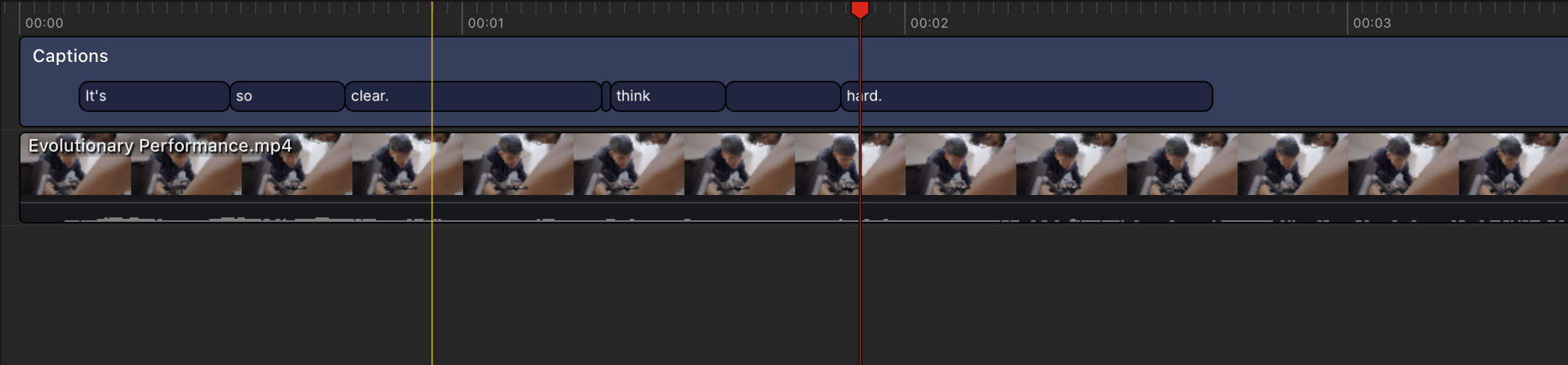
Hover your mouse over the timeline to preview footage in real-time, just like Final Cut Pro. The playhead follows your cursor and video plays in the viewer as you move.
* Click the waves icon in the editor toolbar to toggle skimming on/off
* Start playback while skimming to commit the hovered frame as your new playhead position
## Fast seek
Seeking to any point in your timeline is now dramatically faster. Improved keyframe detection means less waiting when jumping around long videos.
Thumbnail generation is also faster, so your timeline populates quicker when importing new media.
#### Improvements
* Hover states refined across all interactive elements
* Chat now knows which frame you're viewing in the timeline
#### Fixes
* Fixed many large file processing failures
* Fixed face detection state for users with older desktop app
* Fixed storyboard connection drops during editing
# Pro editing tools
New tools that bring Kino's timeline editing closer to professional NLEs. Split, slip, select, and duplicate with familiar keyboard shortcuts.
## Skimming
Hover your mouse over the timeline to preview footage in real-time, just like Final Cut Pro. The playhead follows your cursor and video plays in the viewer as you move.
* Click the waves icon in the editor toolbar to toggle skimming on/off
* Start playback while skimming to commit the hovered frame as your new playhead position
## Fast seek
Seeking to any point in your timeline is now dramatically faster. Improved keyframe detection means less waiting when jumping around long videos.
Thumbnail generation is also faster, so your timeline populates quicker when importing new media.
#### Improvements
* Hover states refined across all interactive elements
* Chat now knows which frame you're viewing in the timeline
#### Fixes
* Fixed many large file processing failures
* Fixed face detection state for users with older desktop app
* Fixed storyboard connection drops during editing
# Pro editing tools
New tools that bring Kino's timeline editing closer to professional NLEs. Split, slip, select, and duplicate with familiar keyboard shortcuts.
 ## Razor tool
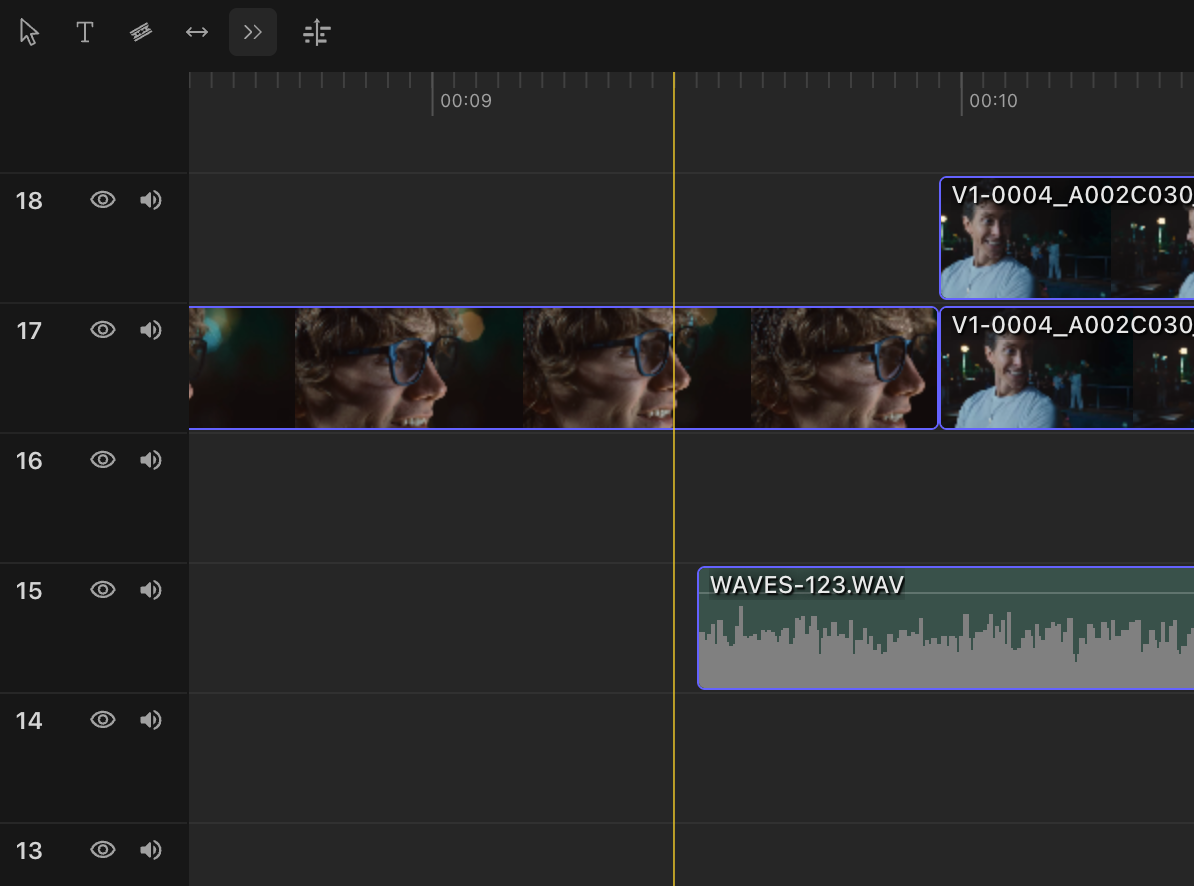
Press **R** to activate the razor tool, then click anywhere on the timeline to split a clip at that point. Just like Premiere Pro.
## Track select forward
**Shift-click** on any clip to select it and everything after it on that track. Perfect for moving entire sections of your edit downstream.
## Option-drag to duplicate
Hold **Option** (Mac) or **Alt** (Windows) while dragging a clip to duplicate it instead of moving it. No more copy-paste-position dance.
## Slip tool
Press **S** to activate the slip tool. Drag left or right on a clip to shift which part of the source media is visible—without changing the clip's position or duration on the timeline. Just like Premiere Pro.
## Cropping
Double-click a video clip to enter crop mode. Drag the handles to adjust the visible frame bounds.
#### Improvements
* Storyboard elements snap to each other and canvas edges
* Drag files into chat or timeline from a unified dropzone
* Chat responses appear as draggable pills you can drop onto the timeline
* Media tags show which source (bin, search, etc.) each clip came from
#### Fixes
* Fixed slider drag behavior resetting unexpectedly
* Fixed storyboard rendering going blank
* Fixed some media files failing to render
* Fixed chat panel shifting down when new messages arrive
# Audio and image support, web search
Drop any media type onto your timeline—images, audio, GIFs. Chat can now search the web to find assets for your project.
## Razor tool
Press **R** to activate the razor tool, then click anywhere on the timeline to split a clip at that point. Just like Premiere Pro.
## Track select forward
**Shift-click** on any clip to select it and everything after it on that track. Perfect for moving entire sections of your edit downstream.
## Option-drag to duplicate
Hold **Option** (Mac) or **Alt** (Windows) while dragging a clip to duplicate it instead of moving it. No more copy-paste-position dance.
## Slip tool
Press **S** to activate the slip tool. Drag left or right on a clip to shift which part of the source media is visible—without changing the clip's position or duration on the timeline. Just like Premiere Pro.
## Cropping
Double-click a video clip to enter crop mode. Drag the handles to adjust the visible frame bounds.
#### Improvements
* Storyboard elements snap to each other and canvas edges
* Drag files into chat or timeline from a unified dropzone
* Chat responses appear as draggable pills you can drop onto the timeline
* Media tags show which source (bin, search, etc.) each clip came from
#### Fixes
* Fixed slider drag behavior resetting unexpectedly
* Fixed storyboard rendering going blank
* Fixed some media files failing to render
* Fixed chat panel shifting down when new messages arrive
# Audio and image support, web search
Drop any media type onto your timeline—images, audio, GIFs. Chat can now search the web to find assets for your project.
 ## Timeline media support
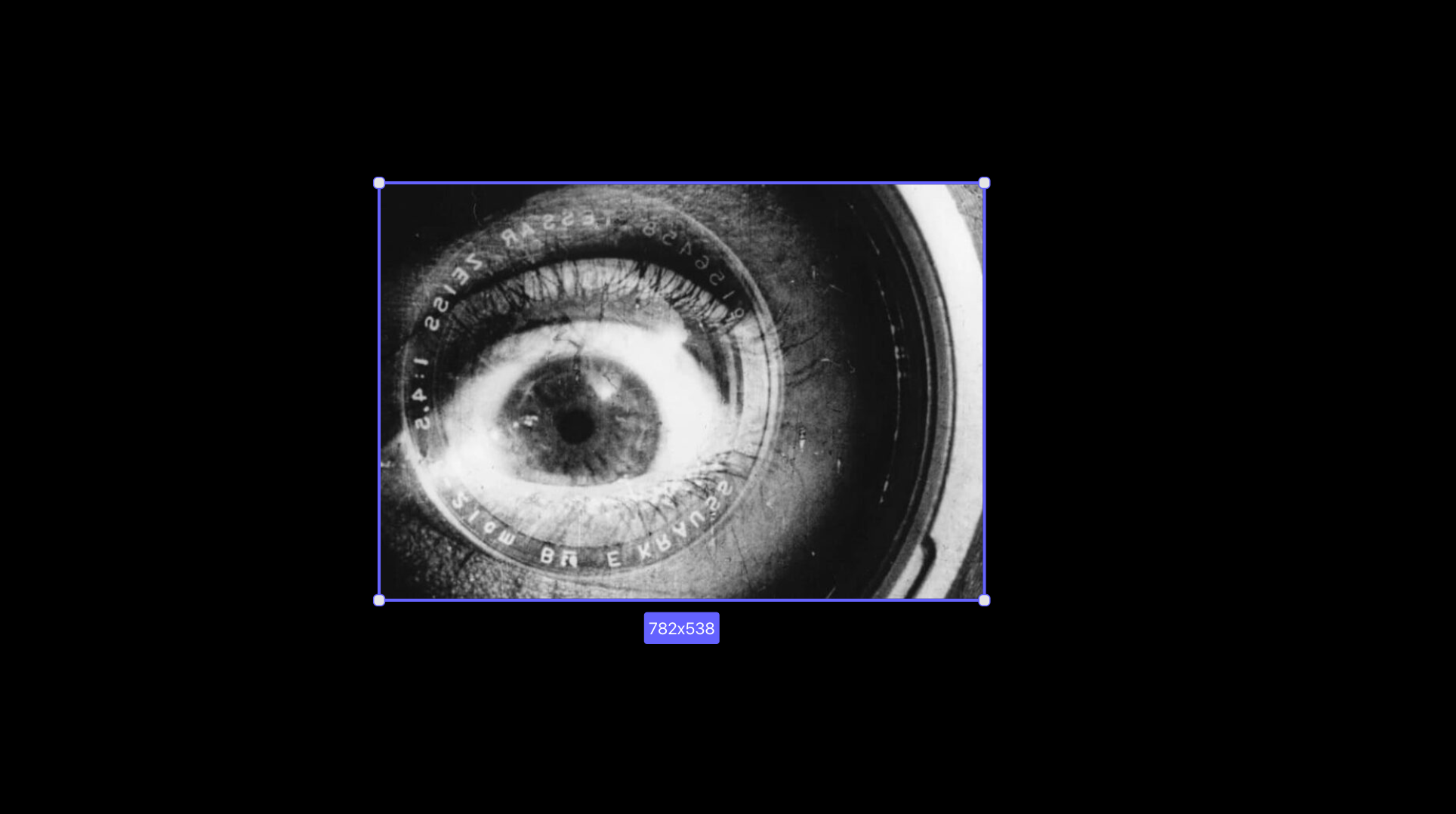
Drag images (PNG, JPG, WebP), audio files, or GIFs directly onto your timeline tracks. They behave just like video clips—trim, move, layer.
## Transparent export
Export your composition with a transparent background as WebM with alpha channel. Perfect for overlays, lower thirds, and motion graphics.
## Web search in chat
Chat can search the web to add assets to your project. Gemini 3 is now available as a chat model option.
#### Improvements
* Captions layer renders via canvas instead of DOM (1000x fewer nodes, no lag on long transcripts)
* Selection-only mode filters media browser to selected clips
* Thumbnails and waveforms generate in-browser (no server round-trip)
* Caption inspector handles 10,000+ word transcripts without lag
* Text elements can be added directly to timeline
* Smoother onboarding when opening editor for first time
#### Fixes
* Fixed unnecessary re-renders slowing down timeline
* Fixed GPU jobs getting stuck in queue
* Timeline clips now have minimum duration (prevents micro-clips)
# Bins & Premiere chat
#### New
* Premiere smart chat: AI can read your Premiere project and answer questions about it
* Playlists renamed to Bins (matches how editors actually think)
* Select footage window: quick popup to pick clips without leaving the editor
* Spritesheet thumbnails load faster than individual frame requests
* Search within specific regions of a frame using visual embeddings
#### Improvements
* Deleted clips now sync properly between database and vector search
* Bin cover images auto-generate from contents
#### Fixes
* Fixed broken screenshot links in docs
* Fixed 404 page crashing in desktop app
* Fixed chat messages sometimes failing to send
## Timeline media support
Drag images (PNG, JPG, WebP), audio files, or GIFs directly onto your timeline tracks. They behave just like video clips—trim, move, layer.
## Transparent export
Export your composition with a transparent background as WebM with alpha channel. Perfect for overlays, lower thirds, and motion graphics.
## Web search in chat
Chat can search the web to add assets to your project. Gemini 3 is now available as a chat model option.
#### Improvements
* Captions layer renders via canvas instead of DOM (1000x fewer nodes, no lag on long transcripts)
* Selection-only mode filters media browser to selected clips
* Thumbnails and waveforms generate in-browser (no server round-trip)
* Caption inspector handles 10,000+ word transcripts without lag
* Text elements can be added directly to timeline
* Smoother onboarding when opening editor for first time
#### Fixes
* Fixed unnecessary re-renders slowing down timeline
* Fixed GPU jobs getting stuck in queue
* Timeline clips now have minimum duration (prevents micro-clips)
# Bins & Premiere chat
#### New
* Premiere smart chat: AI can read your Premiere project and answer questions about it
* Playlists renamed to Bins (matches how editors actually think)
* Select footage window: quick popup to pick clips without leaving the editor
* Spritesheet thumbnails load faster than individual frame requests
* Search within specific regions of a frame using visual embeddings
#### Improvements
* Deleted clips now sync properly between database and vector search
* Bin cover images auto-generate from contents
#### Fixes
* Fixed broken screenshot links in docs
* Fixed 404 page crashing in desktop app
* Fixed chat messages sometimes failing to send
 # Native Premiere panel & new home
## True Premiere panel
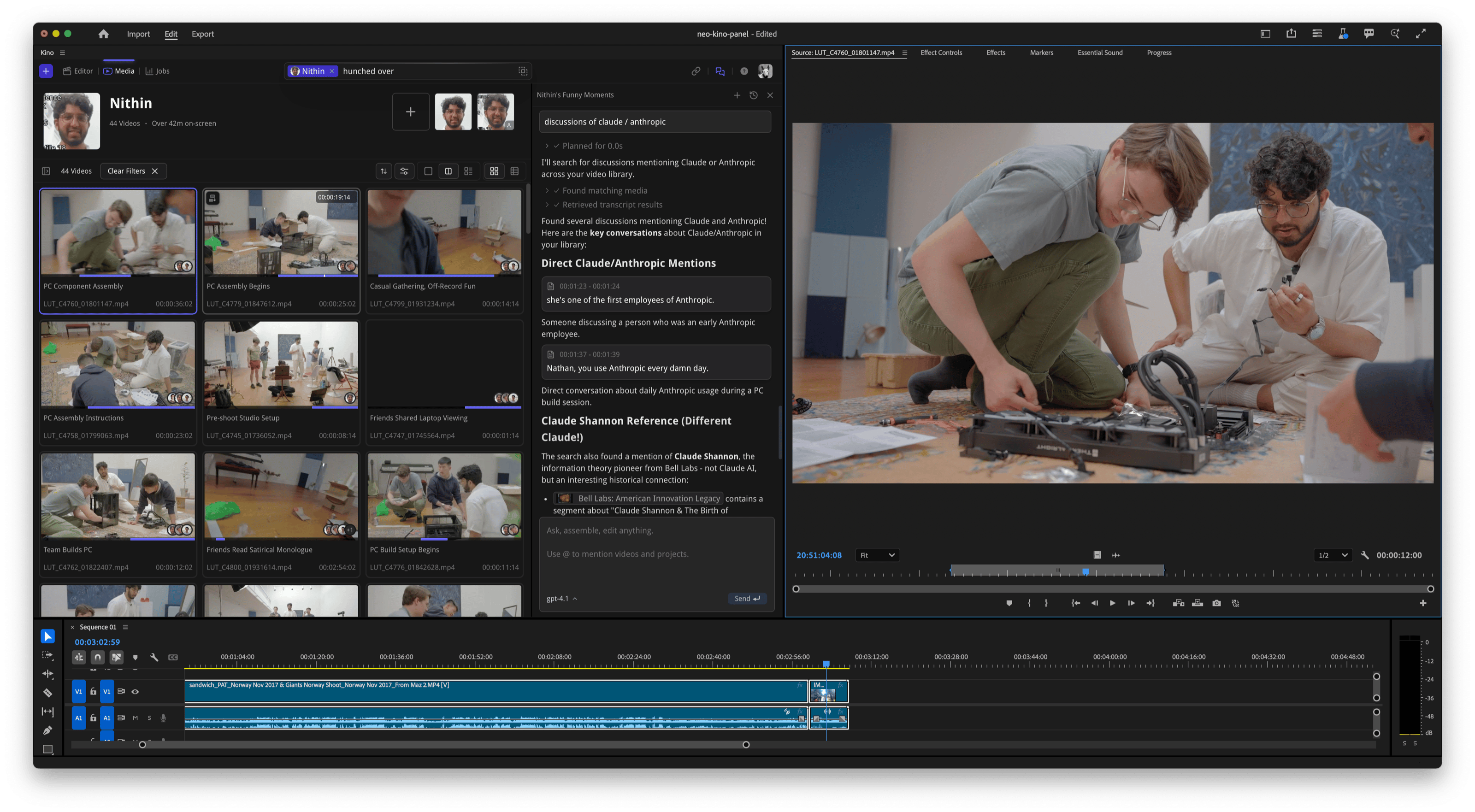
Kino now appears as a native panel directly in Premiere Pro. Search, log footage, tag people, and chat without switching apps.
**Requires Adobe Premiere Pro Beta**
To enable the Kino panel:
1. Make sure you are running the latest version of the Kino desktop app (1.1.14 or higher)
2. Open Premiere Pro (Beta)
3. Go to **Window > UXP Plugins > Kino > Webview Sample**
The panel will appear as a dockable window that you can position anywhere in your Premiere workspace.
# Native Premiere panel & new home
## True Premiere panel
Kino now appears as a native panel directly in Premiere Pro. Search, log footage, tag people, and chat without switching apps.
**Requires Adobe Premiere Pro Beta**
To enable the Kino panel:
1. Make sure you are running the latest version of the Kino desktop app (1.1.14 or higher)
2. Open Premiere Pro (Beta)
3. Go to **Window > UXP Plugins > Kino > Webview Sample**
The panel will appear as a dockable window that you can position anywhere in your Premiere workspace.
 ## Redesigned home page
Completely reimagined Home experience that's more welcoming and intuitive for new users.
#### Improvements
* Native Premiere Pro panel integration
* New Home page interface
* Enhanced drag-and-drop from Kino to Premiere
## Redesigned home page
Completely reimagined Home experience that's more welcoming and intuitive for new users.
#### Improvements
* Native Premiere Pro panel integration
* New Home page interface
* Enhanced drag-and-drop from Kino to Premiere
 # Desktop app overhaul
Kino is now far more reliable and stable, with our desktop app that instantly reads footage from heterogenous sources, communicates directly with both Adobe Premiere and DaVinci Resolve, and allows you to plan your edits for teammates to review.
## Companion mode for Adobe Premiere Pro
If you're running Adobe Premiere, use the "Companion Mode" toggle to work side-by-side with Premiere. Find and chat with your footage, or create a timeline for your edits.
#### Improvements and fixes
* Much faster better scrolling of many items
* Better playback while processing footage
#### Desktop app updates
* 1.1.3: Desktop app now supports back and forward navigation with the toolbar buttons and Logitech mice
* 1.1.4: Faster start time, companion mode improvements, and faster playback while processing footage
## Performance & stability
#### Improved performance
* Kino Linker is significantly faster at serving images and thumbnails
* Improved UI responsiveness across the application
#### Bug fixes
* Fixed various stability issues in the background processing
* Resolved edge cases in video file handling
* General performance optimizations
# Desktop app overhaul
Kino is now far more reliable and stable, with our desktop app that instantly reads footage from heterogenous sources, communicates directly with both Adobe Premiere and DaVinci Resolve, and allows you to plan your edits for teammates to review.
## Companion mode for Adobe Premiere Pro
If you're running Adobe Premiere, use the "Companion Mode" toggle to work side-by-side with Premiere. Find and chat with your footage, or create a timeline for your edits.
#### Improvements and fixes
* Much faster better scrolling of many items
* Better playback while processing footage
#### Desktop app updates
* 1.1.3: Desktop app now supports back and forward navigation with the toolbar buttons and Logitech mice
* 1.1.4: Faster start time, companion mode improvements, and faster playback while processing footage
## Performance & stability
#### Improved performance
* Kino Linker is significantly faster at serving images and thumbnails
* Improved UI responsiveness across the application
#### Bug fixes
* Fixed various stability issues in the background processing
* Resolved edge cases in video file handling
* General performance optimizations