



 Kino
Kino Resolve
DaVinci Resolve is a desktop editor built around one project on one machine, and it now talks to agents through an MCP that costs $295. Kino is agent-native: the project is code, so an agent works in it the way it works in anything else. And it is built for everyone who touches the video, with the editor, the producer, the client and the agent in that one project.
What DaVinci Resolve is for
Resolve is a very good editor and it is free. The cut page is fast, the color page is the industry’s, and the MCP that shipped in 21.1 works: an agent can add clips, make cuts and render. It is Studio only. Blackmagic moved scripting out of the free edition in the same release, so letting an agent touch Resolve is a $295 license, paid once. The deeper limit is older than the MCP. Resolve is a desktop application built around a project on one machine. Everything since has been attached to that: Blackmagic Cloud for sharing, a collaboration mode that needs a shared database and a network admin, and now an MCP that remote-controls the app. Each one works, and Resolve is still a desktop application underneath. There is no library, so footage lives on drives and in bins per project. There is no review, so notes come back by export and spreadsheet. And the agent is a guest pressing buttons on a program built for a mouse, with no view of the timeline as a whole and no idea what is in the footage.
What Kino adds
The core idea in Kino is that video is larger than editors. The producer who knows what was said, the client who has to sign off, the co-host with a note, and the agent doing the assembly all touch the same project.
The library comes first
Import footage from a drive, a NAS or a cloud folder and every clip is transcribed, every face recognized and every shot described. It all goes into one library that every project draws from, so there is no bin to rebuild per project. The originals do not have to be on your machine: Kino streams proxies to everyone on the project and plays the original files on the machine that has them. Search by what was said or shown across everything you have ever shot and get timecoded results.
Agent-native
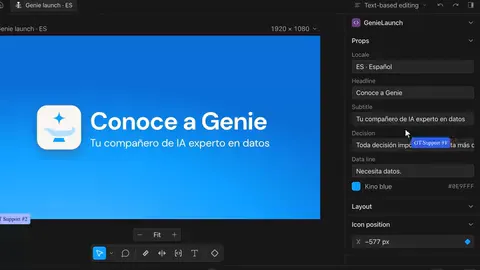
Blackmagic added an MCP to a desktop app the way Sketch once added a cloud to a local file. In Kino the agent you bring reads the whole cut as text, writes the change, and Kino renders it. Claude, Codex or a script you wrote work the same way, because the project is a folder of code. The edit you make by dragging and the edit the agent makes by writing a line are the same edit, and there is no license to buy first.
Multiplayer, with review built in
Two editors can be in the same timeline at the same time, each with their own cursor, with nothing to install and no database to stand up. Share a link to the working cut and co-hosts, clients and sponsors leave notes on the frame that land on that same timeline. When the client’s note lands on the frame, the editor stops relaying notes and goes back to making the cut.
Hand-off to Resolve
When a job needs Resolve’s color page, send the cut over as a timeline with the original media linked. Max at NOX Studios: “I love how Kino automatically connected to DaVinci. Already created a timeline using it.”
Using both
Keep the footage in Kino, cut and review there, and send the timeline to Resolve when a job needs a colorist. That is the one seat Resolve keeps. Kino is the tool for everyone and everything before it.
Side by side
 Resolve Resolve |  Kino Kino | |
|---|---|---|
| Store the footage and keep it organized | Blackmagic Cloud | Yes, one library |
| Edit footage that is offline, or only a teammate has in full | — | Yes |
| Search by what was said, across every project | Per project | Yes, timecoded |
| Search by who is on screen, or what is shown | Faces, per project | Yes |
| Ask an agent to make the edit | Yes, via MCP | Yes, via MCP or in-app |
| Project readable and writable as code | — | Yes, React |
| Frame comments on the working cut | — | Yes |
| Share a review link without exporting | — | Yes |
| Several people in the same timeline at once | — | Yes |
| Price to use it with an agent | $295, Studio | Free |
Who should switch, and who shouldn’t
If every job of yours ends in a Resolve session with a colorist, keep Resolve. If your jobs start with a pile of footage and end with notes from three people, the bottleneck is getting everyone and everything into one place, and a desktop app with an MCP attached does not do that.